

Insight & Help
View any participant desktop enlarged in full screen.
If someone needs help, switch to remote desktop mode with a single click. If necessary, temporarily block further input from the participant.
RoomControl is a teaching interface that lets teachers handle the tasks and challenges of digital lessons with ease. The user interface is self-explanatory, and RoomControl integrates into any existing school network without additional hardware.
The focus is on practical classroom work: distribute and collect materials, get an immediate view of what participants are working on, offer help at any time, present your own content as well as participants' results, control access to programs and the internet individually, and run exams digitally.
Click your way through a complete classroom: a live seating plan with real-time screens, locking screens, sharing the teacher's screen, viewing individual participants, and a full exam workflow from preparation to collecting the results. All directly in your browser.
Best experienced on a laptop or PC. All actions are simulated, no real devices are controlled. (The demo interface is in German. An English version is in the works.)

Control every function from any computer in the network

Distribute and receive files as needed

Full overview of and access to all student PCs at any time
RoomControl is a well-thought-out piece of software developed exclusively for the classroom. It is built around the needs of teachers rather than “system routines”.

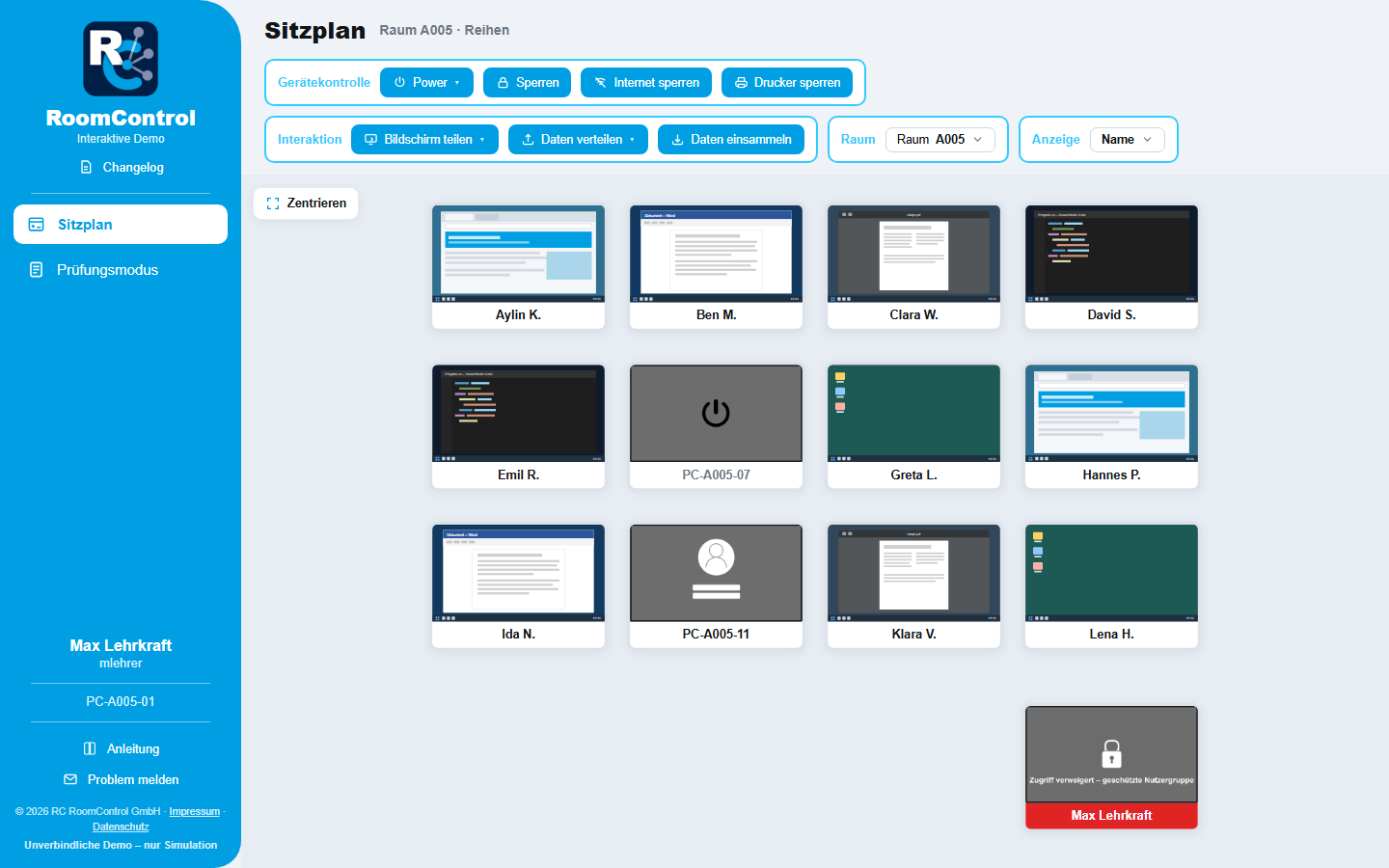
A flexible seating plan mirrors the actual layout of your classroom. Every participant desktop streams a live image directly into the seating plan, so you can see at once who is working on what.
The seating plan can be saved as a screenshot and used as a memory aid for grading. On request, each seat shows:
View any participant desktop enlarged in full screen.
If someone needs help, switch to remote desktop mode with a single click. If necessary, temporarily block further input from the participant.
Share the teacher's screen with all participant screens, in full screen or as a window.
Gone are the days of darkening rooms for the projector image. Everyone sees everything clearly, even in the back row.
Show a participant's screen on all other participant PCs in the room or only on selected ones, in full screen or as a window. You start and stop sharing from the console.
Ideal for project presentations and interactive lessons.
Exchange files and documents directly with the student PCs.
Distribute assignments individually to classes, work groups, or single participants, and collect them just as easily.
Allow or lock internet access and printing precisely: for individual PCs, groups, or the whole room.
Participants' computers can be locked individually or all at once, for undivided attention when it matters.
Computers can be woken up, signed out, shut down, and restarted directly from the software.
RoomControl integrates into your existing school network. No extra devices, no rewiring: install and get started.
RoomControl keeps growing in dialogue with teachers and on-site technical staff. Here is what has been added recently:
Report faulty devices without leaving your lesson: mark the affected PC in the seating plan and describe the problem.
The report reaches your school's IT coordinators in a structured form. They review it and, once approved, forward it to your IT service provider.
Not just IT: issues such as lighting, heating, windows, or furniture can be reported as well. Once your IT coordinators approve them, they are emailed as internal tickets to the school's IT administrator and the custodian.
Exams also work with a guest sign-in. This is ideal for external candidates or participants without their own school account.
Participants sign in with their name, no user account needed.
Hand a planned exam over to a colleague, for example when someone is covering for you or when you are ill. Your colleague then starts and supervises it.
After a restart, participants with a school account sign in again with their password, and the PC stays bound to them.
When setting up an exam, choose the printer that receives the participants' printouts. This works with CUPS and also at schools that print through a Windows print server.
If a printout fails, the participant is told right away. Their work itself is not affected.
If you like, share only individual programs instead of the whole screen, just like in a video conference.
Notes, tips, and announcements appear as soon as you open the RoomControl console, so you always stay up to date.
The internet lock now works directly at the Windows filter level, including at schools that use a proxy. Connections between the PCs and the school server are encrypted.
In the seating plan, choose which programs may start on the selected PCs, and save frequent selections as templates for all teachers at your school. PCs that are switched off receive the restriction as soon as they connect. When you close the console, the restriction ends.
If a program is installed in a different location on the student PCs than on the teachers' PCs, it stays blocked there. Microsoft Store apps such as Notepad on Windows 11 cannot be allowed at this time.
If a device fails or someone arrives late, add more PCs to the exam from the exam dashboard, including PCs in other rooms, as long as they are switched on.
If the exam has already been initialized or started, these PCs restart and then show the exam sign-in screen. Everyone else keeps working without interruption.
Allow a forgotten program after the fact, or block one that was allowed by mistake, without restarting the exam PCs. If a newly blocked program is already running, you can close it right away.
If a program is missing from the list, enter in the console the path where it is installed on the student PCs, both when creating the exam and later on.
Return collected submissions with a single click: choose the folder of a collection run, and RoomControl sends each student's folder, including your comments, to the PC where that student is signed in right now. What counts is the name, not the seat.
Students who are not signed in are listed as “not signed in”. The new “Distributions” window shows the progress.
Define allowed programs, internet access, and materials.
The exam is distributed to all participant PCs.
Keep an eye on the live seating plan; everything not allowed is locked.
The results land automatically on the school server.


RoomControl is developed in direct dialogue with teachers, proven over years in adult education, and chosen by the vocational schools of the City of Cologne.
Funded by


No. RoomControl uses your existing Windows PCs and integrates into your existing school network: no extra devices, no rewiring, just install and get started.
RoomControl is built for Windows. Everything is controlled centrally through the teacher console, which you can use from any PC in the network.
You define in advance which programs are allowed, which software may access the internet, and which materials are provided. The exam is distributed to all participant PCs. During the exam you keep an eye on the live seating plan; everything that is not allowed is locked. At the end you collect the results, and they are stored on the school server.
On your school server. The data stays in house, and there is no cloud requirement.
Yes. In the live seating plan you see the participants' screens, can enlarge individual ones, or help via remote control. Teacher and admin PCs are protected for privacy reasons and cannot be viewed.
Yes. You can try RoomControl directly in your browser, with no obligation and no installation.
We tailor the price individually to your school. Just get in touch, and we will advise you on using RoomControl at your school.
Try RoomControl in your browser with no obligation, or talk to us about using it at your school.